Screens from ready blocks, or your agent's own React, on one data layer.
The Appbricx UI engine builds every page from a short page grammar: stacks, grids, tabs and blocks such as EntityList, EntityForm, Board and CalendarView that read your tables directly. When a screen needs its own look, your agent writes a React component. It gets the same data, sign-in, AI and payments through one typed handle, and is checked before it ships.
- Yours
- KanboBoard.tsxKanboWork.tsxapp.rows, app.live, app.update, app.ai
- Blocks
- TeamAdmin · people, roles, access
- Theme
- midnight-gold, brand #7152F7sidebar navigation, compact density
- Check
- ✓ check_component: types, imports, renders empty
- 17 blocks
- Lists, forms, boards, calendars, team admin
- About 100 primitives
- Charts, tables, maps, embeds, rich text
- Your own React
- app: AppHandle, Tailwind, motion, recharts
- 20 themes
- Plus your exact brand colour
How a screen gets built
Describe pages in the contract: a route, who sees it, and a layout of stack, grid, split, tabs, header, actions and block nodes. Blocks take props such as the table, a presentation (table, cards, rows or grouped), columns and filters.
Where no block fits, the agent writes a component: one TSX file with a default export that receives its props plus app. check_component type-checks it and renders it with sample and empty props in seconds.
Apply. The engine compiles every page into the app with the theme, navigation style and density you chose, and verify opens each page as each role in a real browser.
import { useEffect } from "react";
import { Badge, EmptyState, Stack } from "@app/kit/primitives";
import type { AppHandle } from "@app/kit/primitives";

export default function TaskBoard({ app }: { app?: AppHandle }) {
  useEffect(() => (app ? app.live("task") : undefined), [app]);
  const tasks = app?.rows("task") ?? [];   // only rows this user may read
  if (tasks.length === 0) return <EmptyState title="Nothing due" />;
  return (
    <Stack gap="sm">
      {tasks.map((t) => (
        <button key={String(t.id)} className="rounded-xl border bg-card p-4"
          onClick={() => void app?.transition("task", String(t.id), "status", "done")}>
          {String(t.title)} <Badge text={String(t.status)} />
        </button>
      ))}
    </Stack>
  );
}
One UI layer, from blocks to your own code
Data-bound blocks
EntityList, EntityDetail, EntityForm, StatRow, Board, CalendarView, CatalogGrid, SelectionGrid, Timeline, Matrix, SwipeDeck, TeamAdmin and more read and write your tables, with access applied.
Primitives for your screens
About 100 components from @app/kit/primitives: layout, DataTable, charts, Stat, Avatar, Dialog, Tabs, MapView, Embed, RichTextEditor, Markdown and QrCode.
One typed handle
app.rows, app.query, app.create, app.transition, app.live, app.upload, app.ai, app.call and app.pay, each going through the data API as the signed-in user.
React hooks
useEntityQuery, useRecord and useAggregate return data, loading, error and retry, and refetch when the table changes.
Themes and brand
20 themes, sidebar, topbar or rail navigation, comfortable or compact density, and brand_color for the exact primary colour in light and dark mode.
Checked before it ships
Imports are limited to react, @app/kit/primitives, lucide-react, motion/react, recharts and qrcode.react. No fetch or eval, strict TypeScript, and it must render with no data.
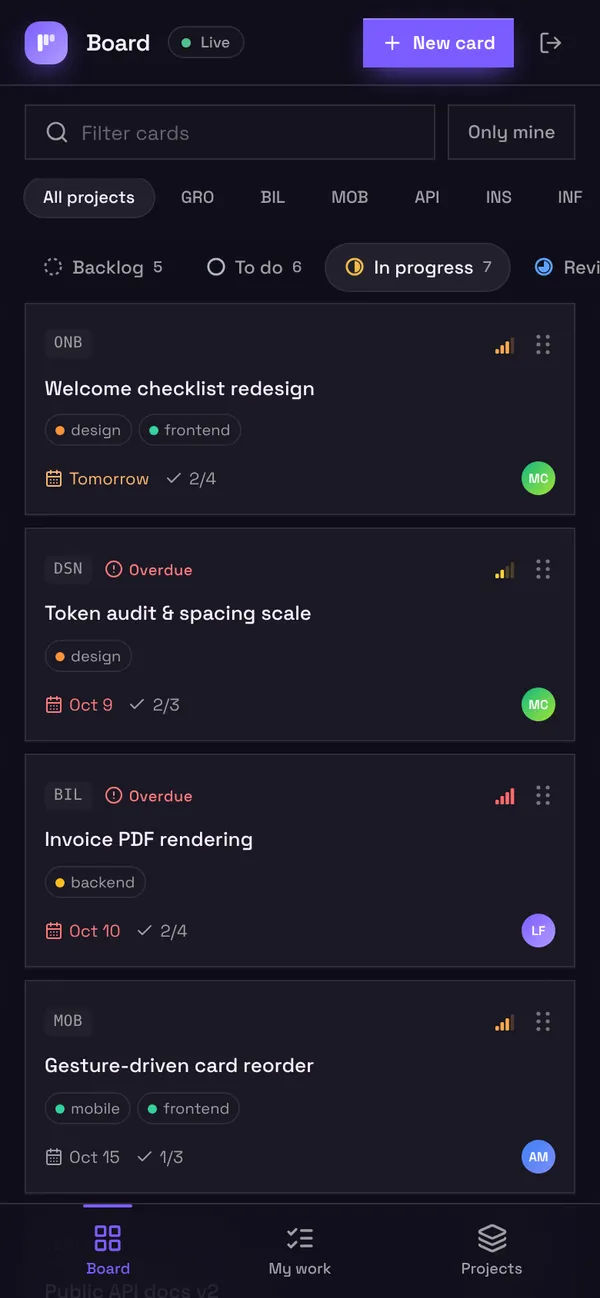
Kanbo's screens are its own components
Kanbo's sign-in, drag-and-drop board and my-work view are React components written by an agent, in Kanbo's own brand colour. Sign in with the demo logins to try each role.
UI components and hooks: common questions
Do I have to write React to get screens?
No. Leave pages out and every table gets a list and form page for its staff roles, or describe pages with blocks. Write a component only where the app needs its own look or interaction.
What can a custom component import?
react, @app/kit/primitives (including the AppHandle type), icons from lucide-react, motion/react for animation, recharts for charts and qrcode.react for QR codes. Styling is Tailwind; the platform compiles exactly the classes the source uses.
Can a component call an outside API?
Not directly: components have no network access. They call a server function with app.call, which runs on the server with your secrets and returns JSON.
Can I change a page's layout without code?
Yes. The builder's Layout editor arranges blocks on a page visually. Saving runs the page through the same checks as a contract change and rebuilds the app.
Can a page drop the app's header and navigation?
Yes. "chrome": "none" lets a component own the whole screen with its own header and tab bar, and "auth": { "screen": "MyLogin" } swaps in your own sign-in screen.